NetSuite to QuickBooks · Automated migration tool · Canada
Leave NetSuite in a day. Your opening balances, migrated automatically.
The SaaS Direct migration tool connects to your NetSuite account and moves your opening balances into QuickBooks Online. It is an opening balances migration: you start in the new system with the right numbers as of your cutover date, typically in one day. If you need full transaction history, that is a different path, and we do that too.
Two ways to leave NetSuite. Pick the one that matches how much history you need on the other side.
15,000+ migrations completed · Trusted by Intuit · Data processed in Canada · Typically one day
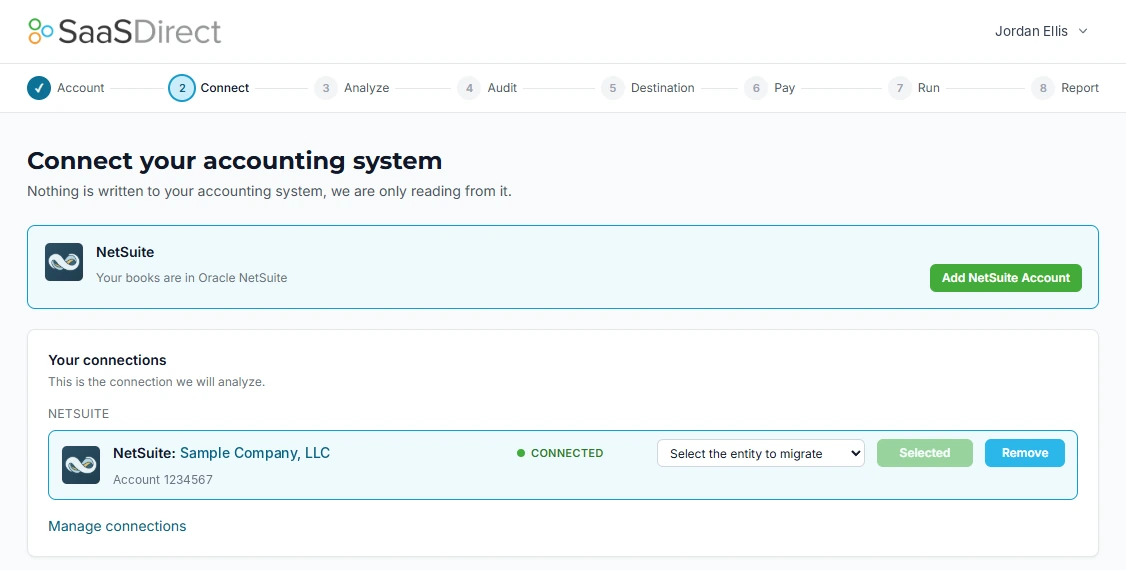
Step 2 of 8: connect NetSuite. Read-only, nothing is written to your books.
Two paths
Automated opening balances, or a full transaction migration.
Both get you off NetSuite and onto QuickBooks. The difference is how much history comes with you, and how long it takes.
| Automated opening balances | Full transaction migration | |
|---|---|---|
| What moves | Chart of accounts, master lists, account balances as of your cutover date, open receivables and payables | Everything in the opening balances path, plus full transaction history with line-level detail, GST/HST, PST and QST history and subsidiaries |
| History in the new system | None before your cutover date. Prior periods stay in NetSuite | Full history, period by period |
| Timeline | Typically one day | 30 days standard. 4 to 8 weeks for multi-entity or extended history |
| How it runs | Automated. The tool reads NetSuite, maps and loads | Run by a SaaS Direct migration team, with a mapping document you approve |
| Destination | QuickBooks Online | QuickBooks Online or QuickBooks Enterprise |
| Sign-off | Trial balance in the new system matches NetSuite as of the cutover date | Reconciliation pack signed off by your controller before cutover |
| Price | Starting at CAD $5,500 | Most projects CAD $10,000 to $25,000, fixed before work starts |
| Start here | Open the migration tool | Full transaction migration |
Choose automated opening balances if
- You want to be live on QuickBooks Online this week, not next quarter
- Your renewal date is close and you need out before it lands
- Prior-period reporting can keep coming from NetSuite reports or an export
- Your NetSuite account is close to standard, without heavy SuiteScript or custom records
- You are starting a new fiscal year or a clean period in the new system
Choose a full transaction migration if
- Your auditors, lenders or board need history inside the new system
- You need comparative reports across years without going back to NetSuite
- GST/HST, PST or QST filing history has to come with you
- You run several subsidiaries with intercompany activity
- Your NetSuite account is heavily customized
- You want invoices, bills and payments searchable by customer and vendor in the new system
The definition
What an opening balances migration is.
It moves where your books stand on one date, not the history behind it. You pick a cutover date. Everything is correct as of that date in the new system, and you work forward from there.
What comes across
- Chart of accounts, with your numbering
- Customers, vendors, items, terms and other master lists
- The balance of every account as of your cutover date
- Open invoices and open bills, brought over as individual transactions, so receivables and payables aging is right on day one
- A trial balance in the new system that ties to NetSuite as of the cutover date
What stays in NetSuite
- Closed transactions from prior periods
- Journal history and period-by-period detail
- SuiteScript, workflows and approval rules
- Saved searches and custom report layouts
- Audit trail: who changed what, and when
Plan for this. Keep read-only NetSuite access or a full export for prior periods. Your auditors will ask for it.
How it works
From NetSuite to QuickBooks in four steps.
The tool does the reading, mapping and loading. You make two decisions and check one report.
- 01
Connect NetSuite
Create a dedicated integration role and an access token in NetSuite, then enter them in the tool. It uses NetSuite token-based authentication, so no password is shared. We can set this up with you on a call.
- 02
Choose destination and cutover date
Confirm your QuickBooks Online company and pick the date your opening balances should be as of.
- 03
Review the mapping and run
The tool reads your NetSuite chart of accounts and lists, maps them to the destination, and loads balances and open items.
- 04
Check the numbers
Compare the trial balance in the new system with NetSuite as of the cutover date. When they tie, you are live.
Access and security
How the tool connects to your NetSuite account.
Token-based authentication
The connection uses NetSuite’s own token-based authentication. Nobody at SaaS Direct needs your NetSuite password.
A dedicated role
Access runs through a dedicated integration role created for the migration, separate from your users, so you can see exactly what it can reach.
You stay in control
You can revoke the access token in NetSuite at any time. When the migration is done, remove the role and the token.
Where you land
QuickBooks Online.
The tool loads your opening balances into a new QuickBooks Online company.
QuickBooks Online
One company, up to 25 users on Advanced, Class and Location for reporting. The right landing point when NetSuite has become more system than your finance team needs.
More than one entity?
Each legal entity lands in its own QuickBooks Online company. If you run several entities, intercompany balances or both CAD and USD books, talk to a migration lead before you start so the right path is scoped first.
Frequently asked
NetSuite migration tool FAQ
What is an opening balances migration?
It moves where your books stand on one date, not the history behind it. Your chart of accounts, your lists, the closing balance of every account as of your cutover date, and the invoices and bills that are still open come across. Closed transactions from earlier periods stay in NetSuite.
How long does the automated NetSuite migration take?
Typically one day. The tool reads your NetSuite data, maps it to QuickBooks Online, loads it, and you check the trial balance in the new system against NetSuite before you start working in it.
Will I be able to see old NetSuite transactions in QuickBooks?
No. An opening balances migration does not bring transaction history. You start with correct balances and open items as of your cutover date. If you need invoices, bills and journals from prior periods inside QuickBooks, choose the full transaction migration.
Which should I choose: opening balances or a full transaction migration?
Choose opening balances if you want to be live fast, your auditors and lenders are satisfied with NetSuite reports for prior periods, and you can keep read-only access to NetSuite or an export. Choose the full transaction migration if you need history inside the new system for audits, comparative reporting or GST/HST, or if your NetSuite account is heavily customized.
Can I start with opening balances and add history later?
Talk to us before you start if that is the plan. Loading history into a company that is already live is harder than doing it once, so if you expect to need history, the full transaction migration is usually the better first move.
How does the tool connect to NetSuite?
Through NetSuite token-based authentication and a dedicated integration role. You never share a NetSuite password, and you can revoke the access token in NetSuite at any time.
Where is our data during the migration?
In Canada. The tool processes your data in Canada, and it only reads from NetSuite. Nothing is written to your NetSuite account.
Two paths off NetSuite. Pick yours.
If opening balances are enough, start in the tool and be live in about a day. If you need your history, we scope a full transaction migration with a fixed price.
Typically one day · 15,000+ migrations completed · Data processed in Canada
Related: NetSuite migrations · Pivot Advantage NetSuite story
Not sure which path?
Talk to a migration lead.
Thirty minutes. Bring your NetSuite edition, subsidiary count and renewal date, and we will tell you which path fits.